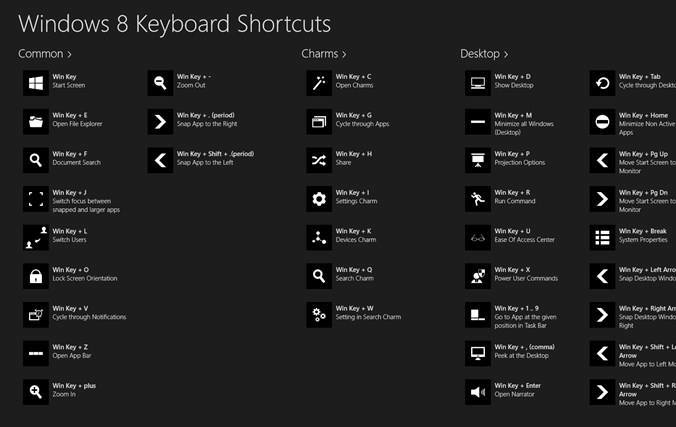
Windows 8 Shortcut Keys
| Keys | Descriptions |
| Windows key | Access the Start screen |
| Windows+D | Access the Desktop. |
| Windows+C | Show the Charms. |
| Windows+Q | Search |
| Windows+H | Share |
| Windows+K | Start Windows Devices |
| Windows+I | Settings |
| Windows+Z | Show the App Bar while in any app. |
| Windows+Tab | Cycle through open apps. |
| Alt+Tab | Cycle through open apps. |
| Zoom in and out | Ctrl+- to zoom out and Ctrl++ to zoom in |
| Windows+period | Snap an app to one side of the screen |
| Start Screen | Windows Key |
| Right Shift key | If you press it for eight seconds, it turns on Filter Keys. If you press it five times in a row, it turns on Sticky Keys. |
| Ctrl+mouse wheel | When used on the desktop, it changes the size of your desktop icons. When used on the Start screen, it zooms in and out. |
| Ctrl+A | Select all. |
| Win+C | Open the charms. |
| Ctrl+C | Copy. |
| Win+D | Show the desktop. |
| Alt +D | Select the address bar in Internet Explorer. |
| Ctrl+Alt +D | Enable the Docked mode in the Magnifier tool. |
| Win+E | Open File Explorer. |
| Ctrl+E | Select the search box in File Explorer. |
| Win+F | Show Files in the Search charm. |
| Win+Ctrl+F | Open the Find Computers window, which can find computers on a network (used mostly in business networks). |
| Win+G | Cycle through desktop gadgets. |
| Win+H | Open the Share charm. |
| Win+I | Open the Settings charm. |
| Ctrl+Alt +I | Invert colors in the Magnifier tool. |
| Win+J | Switch the focus between snapped apps and larger apps. |
| Win+K | Open the Devices charm. |
| Win+L | Lock the computer and display the Lock screen. |
| Ctrl+Alt +L | Enable Lens mode in the Magnifier tool. |
| Win+M | Minimize all the windows on the desktop. |
| Ctrl+N | Open a new File Explorer window. |
| Ctrl+Shift +N | Create a new folder in File Explorer. |
| Win+O | Change the Lock screen orientation. |
| Win+P | Open the project options for a second screen. |
| Win+Q | Open the Search charm. |
| Win+R | Open the Run window. |
| Ctrl+R | Refresh. |
| Win+T | Set the focus on the taskbar and cycle through the running desktop apps. |
| Win+U | Launch the Ease of Access Center. |
| Win+V | Cycle through notifications. |
| Win+Shift +V | Cycle through notifications in backward order. |
| Ctrl+V | Paste. |
| Win+W | Open Settings in the search charm. |
| Ctrl+W | Close the current window. It works only in desktop apps. |
| Win+X | Open the hidden system menu. |
| Ctrl+X | Cut. |
| Ctrl+Y | Redo. |
Tip: When you’re ready to shut down your computer, use Windows+I and then click or tap the Power button, found on the bottom right.
Tip: You’ll find that many of the traditional shortcuts you’ve always used still exist, such as Windows+L to lock and Windows+P to project to another display.
Tip: You’ll find that many of the traditional shortcuts you’ve always used still exist, such as Windows+L to lock and Windows+P to project to another display.